Live TV and sports
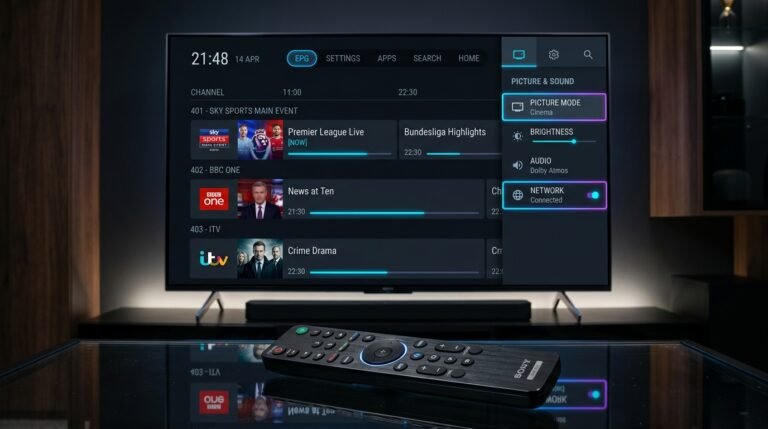
A lineup of 25,000+ channels, shown in HD, Full HD or 4K depending on the channel.
IPTV service


PlayTVX is an IPTV service that streams 25,000+ channels, movies, series and VOD to your TV, phone or computer, in HD, Full HD or 4K depending on the channel. Start with a 24-hour trial for $1.99, and get access within 30 minutes.
Support
PlayTVX support handles setup questions in live chat. These are real conversations with our support team.


Key facts
PlayTVX is an IPTV service with one lineup on every plan. These are the facts to check before you order.
PlayTVX covers live television and a library of titles you can start whenever you like, all in one subscription.
A lineup of 25,000+ channels, shown in HD, Full HD or 4K depending on the channel.
Start a film or a full series when you want, without waiting for a schedule.
Kids and family viewing sits in the same lineup, so one subscription suits the household.
A TV guide shows what is on now and next, so you spend less time searching.
Live chat, WhatsApp and email, with help for installation.
Use a VPN if you prefer one on your network. You choose the player and the device.
PlayTVX customers are usually watching soon after paying: order, get your details, install a player.
Choose the 24-hour trial or a plan. Checkout is PayPal, by card or with a PayPal account.
They arrive by email and WhatsApp within 30 minutes of payment.
Use a player from your official app store, enter your details and pick a channel.
PlayTVX works with the devices below, and one subscription runs on one device at a time. PlayTVX has no player of its own, so each guide covers a third-party player.
Smart TV
Setup guidewebOS TV
Setup guideFire TV Stick and Fire TV
Setup guideAndroid TV and Google TV
Setup guideApple TV box
Setup guideiOS devices
Setup guideComputers
Setup guideRoku TV and players
Setup guideSet-top boxes
Setup guideHow it works
An IPTV service delivers television over the internet instead of through an aerial, cable or satellite. PlayTVX sends channels and on-demand titles as a stream to a player app on your device.
Within 30 min
PlayTVX sends your access details by email and WhatsApp.
Sign in with an M3U link or an Xtream login. Both load the same channels.
The channel list and TV guide load, then you can watch channels, movies and series.
Buffering tips
PlayTVX plans share the same channels. Paying monthly costs $14.99, so 6 months at $5.83 saves you $54.95 (61%), 12 months at $4.17 saves $129.89 (72%) and 24 months at $3.75 saves $269.77 (75%). To compare lengths in detail, see all plan options.
Bronze
6 months
$34.99
Regular price if paid monthly: $89.94 ($14.99 × 6 months)
$5.83 / month
You save $54.95 (61%)
Save 61%
Most popular
Gold
12 months
$49.99
Regular price if paid monthly: $179.88 ($14.99 × 12 months)
$4.17 / month
You save $129.89 (72%)
Save 72%
Diamond
24 months
$89.99
Regular price if paid monthly: $359.76 ($14.99 × 24 months)
$3.75 / month
You save $269.77 (75%)
Save 75%
Monthly
1 month
$14.99 / month
Pay $14.99 each month for the same channels and features as the longer plans. It suits a short stay or a month of viewing after your trial.
Switch to 12 months: $4.17/month and you save $129.89 (72%) in a year.
24-hour trial
PlayTVX lets you watch the service on your own device for 24 hours for $1.99 before you pick a plan.
$1.99
One-time payment for 24 hours. No renewal.
Minute 0
Check out with a card or a PayPal account.
Within 30 minutes
They arrive by email and WhatsApp. Install a player and sign in.
Hour 24
It does not renew. Choose a plan if you want to keep watching.
The $1.99 is a one-time payment and is not refundable. If you move to a 12-month or 24-month plan, $1.99 is deducted from the price. Read the full trial details.
Guides
PlayTVX guides explain how IPTV works, which login to use and what to do when something looks wrong.
30/06/2026
Wondering what is IPTV and how does it work? This beginner-friendly guide explains everything about Internet Protocol Television in simple…
Read article19/07/2026
M3U vs Xtream Codes: Which IPTV Login Method Should You Use? When you purchase a premium IPTV subscription, your provider…
Read article23/07/2026
Fix an IPTV EPG that is empty, delayed or showing the wrong programs with a clear diagnostic order for TiviMate,…
Read article23/07/2026
Find the internet speed you need for SD, HD, Full HD and 4K IPTV, calculate bandwidth for multiple streams and…
Read article19/07/2026
Fix iptv buffering is a crucial topic for cord-cutters. Nothing ruins a movie night or a live sports match faster…
Read article16/10/2026
An IPTV M3U playlist is a plain-text channel list. Learn M3U vs M3U8, how to load it in an IPTV…
Read articleQuestions
An IPTV service delivers live TV, movies and shows over the internet. You subscribe, install a player on your TV, phone or computer, and sign in with the details the provider sends. Because the content arrives as a stream, you need a stable connection. PlayTVX is an IPTV service with 25,000+ channels and VOD.
After you pay, an IPTV service sends login details. You install a player app, enter the details, and the player loads the channel list and TV guide. You then pick a channel and it streams over your internet connection. Our guide on how IPTV works covers the basics in more depth.
PlayTVX includes live TV and sports, movies, series and VOD, family and kids channels and a TV guide, from a lineup of 25,000+ channels. Quality is HD, Full HD or 4K depending on the channel. Support is by live chat, WhatsApp and email, and a VPN is supported. Every plan has the same features.
PlayTVX works on Smart TVs such as Samsung, LG and Android TV, Amazon Fire TV, Apple TV, Roku, Android phones and tablets, iPhone and iPad, Windows, Mac, MAG boxes and Enigma2. You install a third-party player from your official app store. A subscription runs on one device at a time.
An IPTV service needs at least 15 Mbps for HD streams. A wired Ethernet connection is more stable than Wi-Fi, especially when several people share the network. If you see stalls, read our guide on internet speed for IPTV to check your speed and your router placement.
Buffering usually comes from a slow or busy connection, weak Wi-Fi, or a device that is short on memory. Try a wired connection, restart the player and the router, and close other streams on the network. Our guide on fixing buffering and freezing walks through the checks in order.
PlayTVX sends your access details within 30 minutes of payment, by email and WhatsApp. Install a player from your official app store, enter the details and start watching. Pay by card or PayPal account. If you are stuck, support can help by live chat, WhatsApp or email.
PlayTVX has 25,000+ channels, but the number is only part of the picture. What matters is whether the channels you watch are in the lineup, how clear they look, and how reliable the stream is. Test it on your own device with the 24-hour trial for $1.99 before you choose a plan.
Test PlayTVX's IPTV service on your own device: pay $1.99 once for 24 hours and check the channels, quality and setup yourself.